GolfGuiders  Logo
  • 1. Jira
  • Doc
  • Sample Page
  • What is GolfGuiders?
  • Web Docs
    • Getting Started
      • Reset Password
      • Access GolfGuiders Dashboard
    • Settings
    • Golf Store
      • Access Store
      • Seller Central
        • Dashboard
        • Store Customization
        • Store Pages
        • Products
        • Stocks
        • Orders
        • Invoices
        • Refunds
        • Payouts
        • Reviews
        • Discounts
      • Customer Panel
        • Dashboard
        • Addresses
        • Orders
        • Refunds
    • Shop
      • Browse Products
      • Product Details
      • Cart Manage
      • Checkout & Payment
  • App Docs
    • Getting Started
      • Download App
      • Account Setup
      • Recover Password
      • Loggin In
      • Security & Privacy
    • Marketplace
    • Bag Traxx
    • Profile Setup
      • Personal Information
      • Contact Details
      • Experience – Coach
      • Services and Pricing – Coach
      • Booking Calender – Coach
    • Social Media
      • Feeds
      • Posts
      • Stories
      • Messaging
    • Guiders AI
      • Access
      • Ask Guiders AI
      • Chat History
    • Notifications
      • Access
      • Notify Settings
      • Types
      • Manage
    • Friends
      • Friend List
      • Friend Request
      • Suggested Friends
      • Invite Friends
      • Blocking
    • Shopping
      • Browse Products
      • Product Details
      • Cart Management
      • Checkout & Payment
      • Manage Addresses
      • My Orders
      • My Refunds
    • Community
      • Browse
      • Community Detail
      • Manage Community
        • Edit Community Details
        • Create Feed
        • Create Event
        • Leagues
        • Members
      • Create Community
    • Coaches
      • Explore
      • Profile Overview
      • Book a Session
      • Sessions
      • Session Details
    • Golf Buddy
      • Create Buddy Post
      • Join Buddy Post
      • Manage Requests
      • Buddy Filters
    • Tournament
      • Play Tournament
      • Tournamnet Detail
        • Upcoming
        • Live
        • Ended
      • Create Tournament
      • Scoring Methods
    • Golf News
      • Access News
      • Articles News
      • Video News
    • Pro Leaderboard
      • Live Scores
      • Tickets
      • Tournament Details
    • GPS Navigation
      • Play
      • Explore
      • Google Maps
    • Trips
      • Browse
      • Brand Page
      • Create Brand
      • Manage
    • Account Settings
      • Phone Number
      • Password
    • Golf Store
      • Create Your Store
      • How to Access Your Store
      • Store Management
      • Store Profile & Customization
      • Products and Inventory
      • Orders and Fulfillment
      • Shipping
      • Payments and Billing
      • Customer Engagement
      • Analytics and Insights
    • Help & Report
      • Help Center
      • Report a Problem
  • Home
  • Docs
  • Web Docs
  • Settings
  • Web Docs
    • Getting Started
      • Reset Password
      • Access GolfGuiders Dashboard
    • Settings
    • Golf Store
      • Access Store
      • Seller Central
        • Dashboard
        • Store Customization
        • Store Pages
        • Products
        • Stocks
        • Orders
        • Invoices
        • Refunds
        • Payouts
        • Reviews
        • Discounts
      • Customer Panel
        • Dashboard
        • Addresses
        • Orders
        • Refunds
    • Shop
      • Browse Products
      • Product Details
      • Cart Manage
      • Checkout & Payment
  • App Docs
    • Getting Started
      • Download App
      • Account Setup
      • Recover Password
      • Loggin In
      • Security & Privacy
    • Marketplace
    • Bag Traxx
    • Profile Setup
      • Personal Information
      • Contact Details
      • Experience – Coach
      • Services and Pricing – Coach
      • Booking Calender – Coach
    • Social Media
      • Feeds
      • Posts
      • Stories
      • Messaging
    • Guiders AI
      • Access
      • Ask Guiders AI
      • Chat History
    • Notifications
      • Access
      • Notify Settings
      • Types
      • Manage
    • Friends
      • Friend List
      • Friend Request
      • Suggested Friends
      • Invite Friends
      • Blocking
    • Shopping
      • Browse Products
      • Product Details
      • Cart Management
      • Checkout & Payment
      • Manage Addresses
      • My Orders
      • My Refunds
    • Community
      • Browse
      • Community Detail
      • Manage Community
        • Edit Community Details
        • Create Feed
        • Create Event
        • Leagues
        • Members
      • Create Community
    • Coaches
      • Explore
      • Profile Overview
      • Book a Session
      • Sessions
      • Session Details
    • Golf Buddy
      • Create Buddy Post
      • Join Buddy Post
      • Manage Requests
      • Buddy Filters
    • Tournament
      • Play Tournament
      • Tournamnet Detail
        • Upcoming
        • Live
        • Ended
      • Create Tournament
      • Scoring Methods
    • Golf News
      • Access News
      • Articles News
      • Video News
    • Pro Leaderboard
      • Live Scores
      • Tickets
      • Tournament Details
    • GPS Navigation
      • Play
      • Explore
      • Google Maps
    • Trips
      • Browse
      • Brand Page
      • Create Brand
      • Manage
    • Account Settings
      • Phone Number
      • Password
    • Golf Store
      • Create Your Store
      • How to Access Your Store
      • Store Management
      • Store Profile & Customization
      • Products and Inventory
      • Orders and Fulfillment
      • Shipping
      • Payments and Billing
      • Customer Engagement
      • Analytics and Insights
    • Help & Report
      • Help Center
      • Report a Problem

On This Page

  • General Settings
    • Profile Settings
      • Security Settings
        • Notes
          • Best Practices
            • Related Topics

              Settings

              Updated on August 4, 2025

              The Settings module allows users to manage their GolfGuiders profile and preferences — whether they are store owners, regular customers, or general community members. Changes made here apply globally across the entire GolfGuiders ecosystem, including Golf Store, Golf News, Golf Feeds, and more.

              Accessing Settings

              Users can access settings by clicking their avatar in the top navigation bar. A dialog menu will appear with the following options:
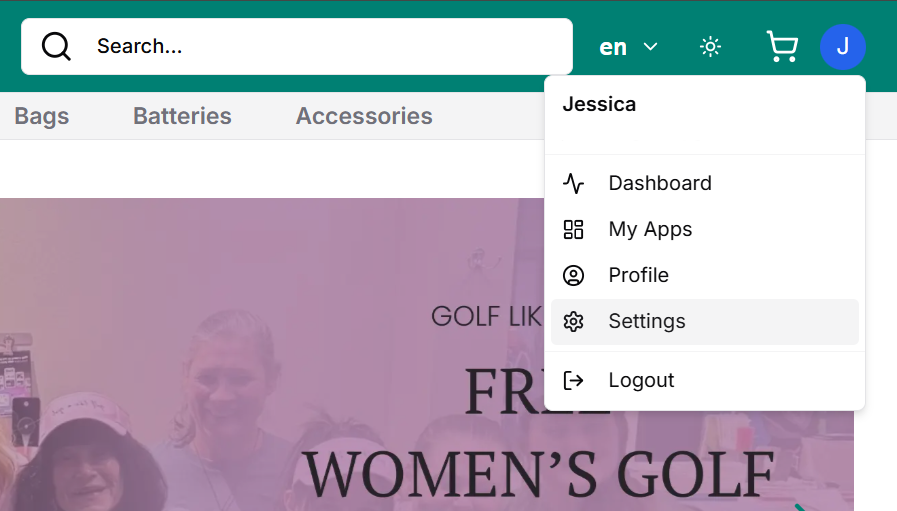
              • Dashboard
                • Customers → Customer Panel
                • Store Owners → Seller Central
              • Profile
                • Redirects to Settings > Profile
              • Settings
                • Opens the complete Settings panel, where you can manage
                  • General preferences
                  • Profile details
                  • Security settings

              General Settings

              Control basic preferences for your experience across GolfGuiders.

              • Theme Mode
                • Choose between Light and Dark modes.
                • Changes are applied instantly across all GolfGuiders interfaces.
              • Language
                • Select preferred platform language (if multiple languages are available).
                • Useful for regional access and better comprehension.
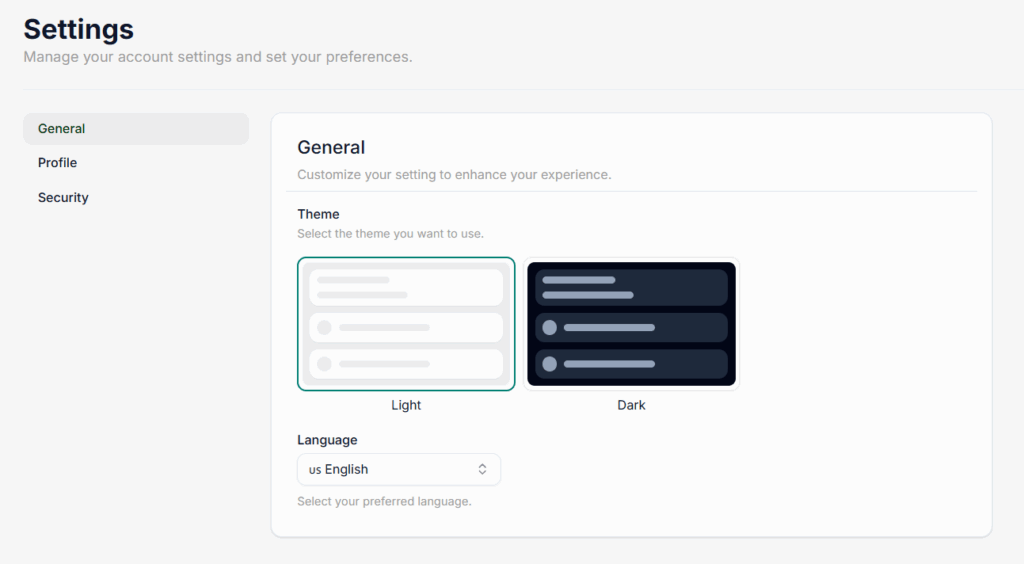
              💡 Theme and language preferences are stored per user and persist across all devices when logged in.

              Profile Settings

              Personalize your public and community-facing identity. Any changes here will reflect across all GolfGuiders services.

              • Cover Photo – Upload a wide banner-style image for Golf feeds.
              • Profile Photo – Your main display picture (avatar).
              • First Name / Last Name – Editable name used platform-wide.
              • Gender – Optional, used for personalization.
              • Email – Must be unique; used for login and notifications.
              • Optional Info:
                • Bio – A short description about you.
                • Handicap – For golfers who want to showcase their level.
                  Your golf handicap shows your skill level—e.g., a handicap of 10 means you usually score 10 over par. It’s optional but helps personalize your golfing profile.
                • Hobbies – Type a hobby and press Enter to add. Hobbies appear as removable badges.

              🔄 All changes made in the Profile tab are reflected globally (e.g., name updated from Golf Store reflects instantly in Golf News).

              Security Settings

              Manage account protection and password changes.

              • Change Password
                • Current Password (for verification)
                • New Password
                • Confirm Password

              🔐 Passwords must meet platform security standards and should be updated regularly for better safety.

              Notes

              • Any setting change is synced across the platform in real-time.
              • If you’re logged into multiple GolfGuiders services (Store, News, Feeds), updates will appear immediately across all.
              • You can always revisit and update settings from any GolfGuiders module.

              Best Practices

              • Keep profile information updated, especially name and email for smoother communication.
              • Use a clear profile photo and meaningful bio to improve trust in the community (especially useful for sellers).
              • Regularly update your password and avoid using the same one across multiple platforms.
              • Choose a theme that matches your environment (Dark Mode is ideal for low light).
              • Review hobby badges periodically — they shape how other users see your profile.

              Related Topics

              • How to update profile settings in mobile app?
              • How to change passwords in mobile app?

              • #account settings
              • #customer
              • #password
              • #seller
              • #settings
              • #web store

              Next

              Golf Store
              Read
              Shop
              Read

              On This Page

              • General Settings
                • Profile Settings
                  • Security Settings
                    • Notes
                      • Best Practices
                        • Related Topics
                          Back to top
                          GolfGuiders  Logo

                          All rights reserved

                          Searching in

                          Enter search term to find items
                          to navigate, to select, and to close