GolfGuiders  Logo
  • 1. Jira
  • Doc
  • Sample Page
  • What is GolfGuiders?
  • Web Docs
    • Getting Started
      • Reset Password
      • Access GolfGuiders Dashboard
    • Settings
    • Golf Store
      • Access Store
      • Seller Central
        • Dashboard
        • Store Customization
        • Store Pages
        • Products
        • Stocks
        • Orders
        • Invoices
        • Refunds
        • Payouts
        • Reviews
        • Discounts
      • Customer Panel
        • Dashboard
        • Addresses
        • Orders
        • Refunds
    • Shop
      • Browse Products
      • Product Details
      • Cart Manage
      • Checkout & Payment
  • App Docs
    • Getting Started
      • Download App
      • Account Setup
      • Recover Password
      • Loggin In
      • Security & Privacy
    • Marketplace
    • Bag Traxx
    • Profile Setup
      • Personal Information
      • Contact Details
      • Experience – Coach
      • Services and Pricing – Coach
      • Booking Calender – Coach
    • Social Media
      • Feeds
      • Posts
      • Stories
      • Messaging
    • Guiders AI
      • Access
      • Ask Guiders AI
      • Chat History
    • Notifications
      • Access
      • Notify Settings
      • Types
      • Manage
    • Friends
      • Friend List
      • Friend Request
      • Suggested Friends
      • Invite Friends
      • Blocking
    • Shopping
      • Browse Products
      • Product Details
      • Cart Management
      • Checkout & Payment
      • Manage Addresses
      • My Orders
      • My Refunds
    • Community
      • Browse
      • Community Detail
      • Manage Community
        • Edit Community Details
        • Create Feed
        • Create Event
        • Leagues
        • Members
      • Create Community
    • Coaches
      • Explore
      • Profile Overview
      • Book a Session
      • Sessions
      • Session Details
    • Golf Buddy
      • Create Buddy Post
      • Join Buddy Post
      • Manage Requests
      • Buddy Filters
    • Tournament
      • Play Tournament
      • Tournamnet Detail
        • Upcoming
        • Live
        • Ended
      • Create Tournament
      • Scoring Methods
    • Golf News
      • Access News
      • Articles News
      • Video News
    • Pro Leaderboard
      • Live Scores
      • Tickets
      • Tournament Details
    • GPS Navigation
      • Play
      • Explore
      • Google Maps
    • Trips
      • Browse
      • Brand Page
      • Create Brand
      • Manage
    • Account Settings
      • Phone Number
      • Password
    • Golf Store
      • Create Your Store
      • How to Access Your Store
      • Store Management
      • Store Profile & Customization
      • Products and Inventory
      • Orders and Fulfillment
      • Shipping
      • Payments and Billing
      • Customer Engagement
      • Analytics and Insights
    • Help & Report
      • Help Center
      • Report a Problem
  • Home
  • Docs
  • Web Docs
  • Getting Started
  • Reset Password
  • Web Docs
    • Getting Started
      • Reset Password
      • Access GolfGuiders Dashboard
    • Settings
    • Golf Store
      • Access Store
      • Seller Central
        • Dashboard
        • Store Customization
        • Store Pages
        • Products
        • Stocks
        • Orders
        • Invoices
        • Refunds
        • Payouts
        • Reviews
        • Discounts
      • Customer Panel
        • Dashboard
        • Addresses
        • Orders
        • Refunds
    • Shop
      • Browse Products
      • Product Details
      • Cart Manage
      • Checkout & Payment
  • App Docs
    • Getting Started
      • Download App
      • Account Setup
      • Recover Password
      • Loggin In
      • Security & Privacy
    • Marketplace
    • Bag Traxx
    • Profile Setup
      • Personal Information
      • Contact Details
      • Experience – Coach
      • Services and Pricing – Coach
      • Booking Calender – Coach
    • Social Media
      • Feeds
      • Posts
      • Stories
      • Messaging
    • Guiders AI
      • Access
      • Ask Guiders AI
      • Chat History
    • Notifications
      • Access
      • Notify Settings
      • Types
      • Manage
    • Friends
      • Friend List
      • Friend Request
      • Suggested Friends
      • Invite Friends
      • Blocking
    • Shopping
      • Browse Products
      • Product Details
      • Cart Management
      • Checkout & Payment
      • Manage Addresses
      • My Orders
      • My Refunds
    • Community
      • Browse
      • Community Detail
      • Manage Community
        • Edit Community Details
        • Create Feed
        • Create Event
        • Leagues
        • Members
      • Create Community
    • Coaches
      • Explore
      • Profile Overview
      • Book a Session
      • Sessions
      • Session Details
    • Golf Buddy
      • Create Buddy Post
      • Join Buddy Post
      • Manage Requests
      • Buddy Filters
    • Tournament
      • Play Tournament
      • Tournamnet Detail
        • Upcoming
        • Live
        • Ended
      • Create Tournament
      • Scoring Methods
    • Golf News
      • Access News
      • Articles News
      • Video News
    • Pro Leaderboard
      • Live Scores
      • Tickets
      • Tournament Details
    • GPS Navigation
      • Play
      • Explore
      • Google Maps
    • Trips
      • Browse
      • Brand Page
      • Create Brand
      • Manage
    • Account Settings
      • Phone Number
      • Password
    • Golf Store
      • Create Your Store
      • How to Access Your Store
      • Store Management
      • Store Profile & Customization
      • Products and Inventory
      • Orders and Fulfillment
      • Shipping
      • Payments and Billing
      • Customer Engagement
      • Analytics and Insights
    • Help & Report
      • Help Center
      • Report a Problem

Reset Password

Updated on August 4, 2025

If you’ve forgotten your password, you can easily reset it through the GolfGuiders web portal. Follow the steps below to securely regain access to your account.

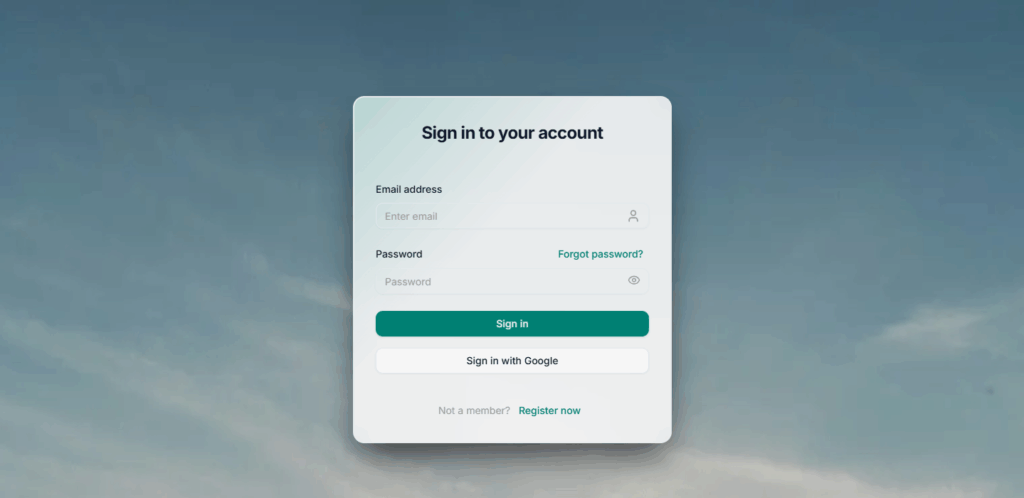
Step 1: Go to the Login Page

Visit auth.golfguiders.com
You’ll see the login screen where you can sign in using your email and password.

Click the “Forgot password?” link just below the password field.
Step 2: Request a Reset Code

You’ll be redirected to the Forgot Password page.

Enter your registered email address in the input field.

Click Confirm.
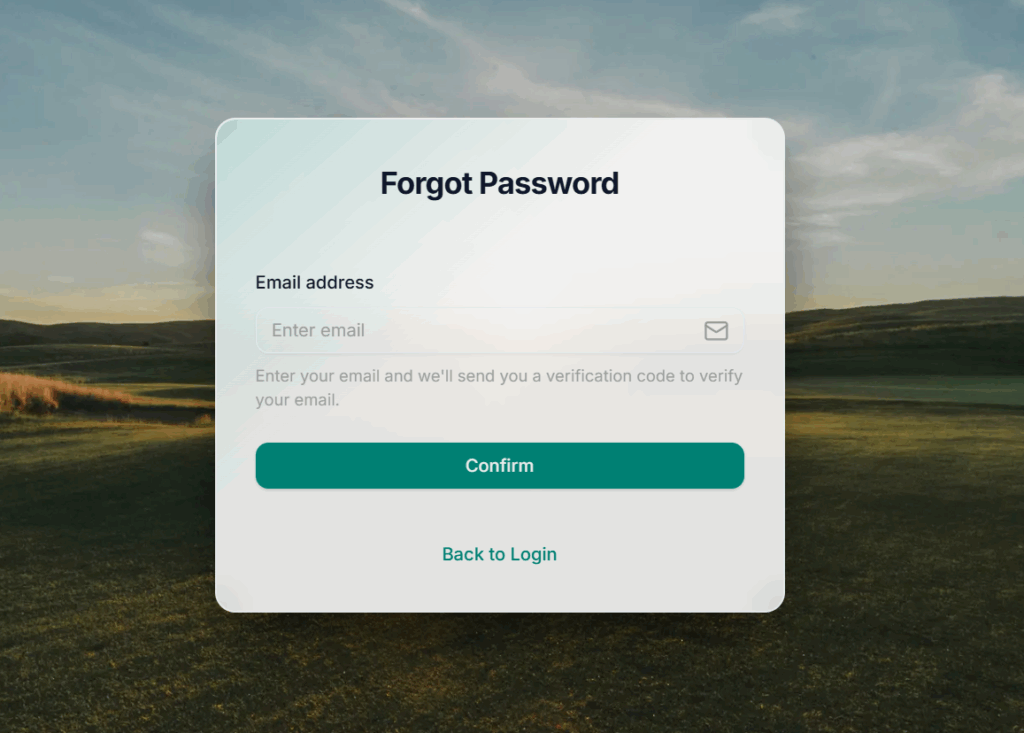
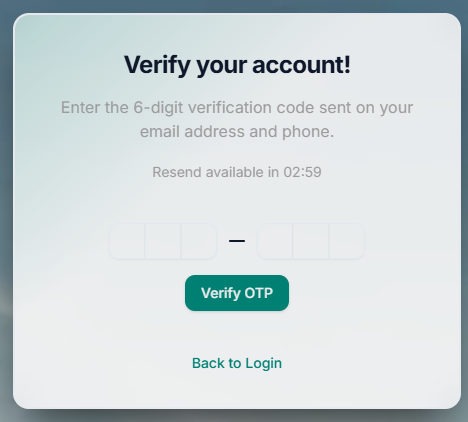
GolfGuiders will send you a verification code (OTP) via:

Email, and

SMS (if your phone number is linked to your account)
Step 3: Verify Your Identity

Check yo6ur email (and SMS if applicable) for the OTP code.

Enter the code in the verification field on the OTP screen.

Click Verify to continue.
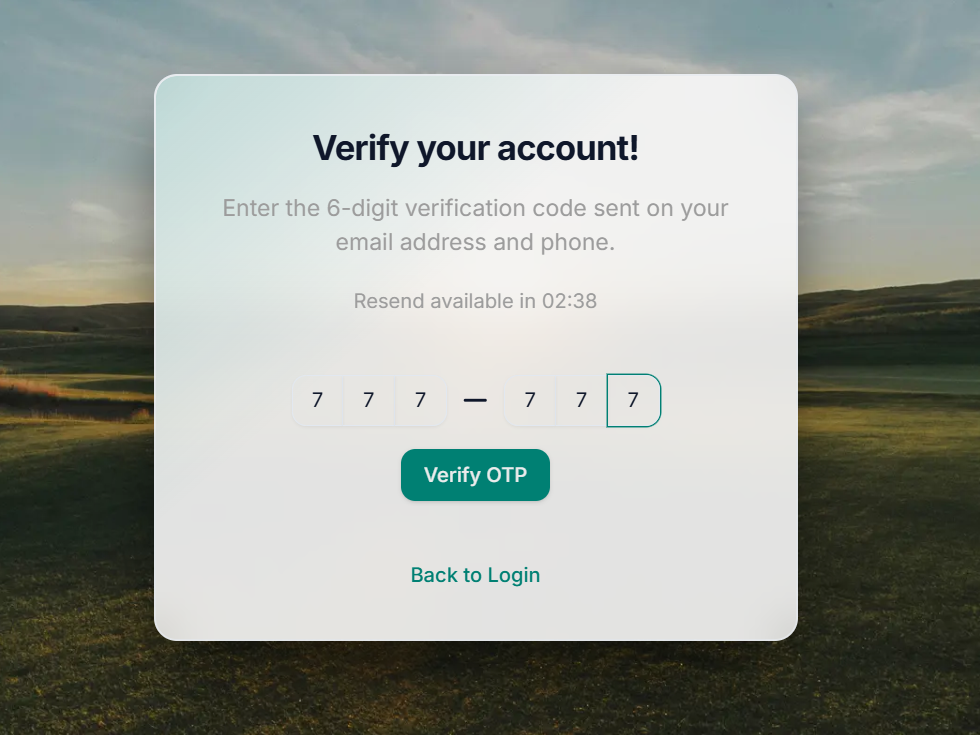
This step ensures that only you can access and reset your account password.

Step 4: Set a New Password

Once verified, you’ll be taken to the Reset Password screen.

Enter a new secure password.

Confirm the password in the second field.

Click Update to complete the process.
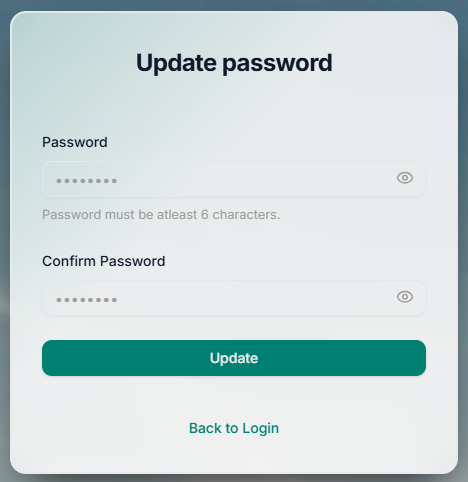
After this, you can return to the login page and access your account with your new credentials.

Tips for a Strong Password

  • Use at least 8 characters
  • Include upper and lower case letters
  • Add numbers and symbols for better security

  • #login
  • #password
  • #web

Next

Access GolfGuiders Dashboard
Read
GolfGuiders  Logo

All rights reserved

Searching in

Enter search term to find items
to navigate, to select, and to close