GolfGuiders  Logo
  • 1. Jira
  • Doc
  • Sample Page
  • What is GolfGuiders?
  • Web Docs
    • Getting Started
      • Reset Password
      • Access GolfGuiders Dashboard
    • Settings
    • Golf Store
      • Access Store
      • Seller Central
        • Dashboard
        • Store Customization
        • Store Pages
        • Products
        • Stocks
        • Orders
        • Invoices
        • Refunds
        • Payouts
        • Reviews
        • Discounts
      • Customer Panel
        • Dashboard
        • Addresses
        • Orders
        • Refunds
    • Shop
      • Browse Products
      • Product Details
      • Cart Manage
      • Checkout & Payment
  • App Docs
    • Getting Started
      • Download App
      • Account Setup
      • Recover Password
      • Loggin In
      • Security & Privacy
    • Marketplace
    • Bag Traxx
    • Profile Setup
      • Personal Information
      • Contact Details
      • Experience – Coach
      • Services and Pricing – Coach
      • Booking Calender – Coach
    • Social Media
      • Feeds
      • Posts
      • Stories
      • Messaging
    • Guiders AI
      • Access
      • Ask Guiders AI
      • Chat History
    • Notifications
      • Access
      • Notify Settings
      • Types
      • Manage
    • Friends
      • Friend List
      • Friend Request
      • Suggested Friends
      • Invite Friends
      • Blocking
    • Shopping
      • Browse Products
      • Product Details
      • Cart Management
      • Checkout & Payment
      • Manage Addresses
      • My Orders
      • My Refunds
    • Community
      • Browse
      • Community Detail
      • Manage Community
        • Edit Community Details
        • Create Feed
        • Create Event
        • Leagues
        • Members
      • Create Community
    • Coaches
      • Explore
      • Profile Overview
      • Book a Session
      • Sessions
      • Session Details
    • Golf Buddy
      • Create Buddy Post
      • Join Buddy Post
      • Manage Requests
      • Buddy Filters
    • Tournament
      • Play Tournament
      • Tournamnet Detail
        • Upcoming
        • Live
        • Ended
      • Create Tournament
      • Scoring Methods
    • Golf News
      • Access News
      • Articles News
      • Video News
    • Pro Leaderboard
      • Live Scores
      • Tickets
      • Tournament Details
    • GPS Navigation
      • Play
      • Explore
      • Google Maps
    • Trips
      • Browse
      • Brand Page
      • Create Brand
      • Manage
    • Account Settings
      • Phone Number
      • Password
    • Golf Store
      • Create Your Store
      • How to Access Your Store
      • Store Management
      • Store Profile & Customization
      • Products and Inventory
      • Orders and Fulfillment
      • Shipping
      • Payments and Billing
      • Customer Engagement
      • Analytics and Insights
    • Help & Report
      • Help Center
      • Report a Problem
  • Home
  • Docs
  • App Docs
  • Friends
  • Blocking
  • Web Docs
    • Getting Started
      • Reset Password
      • Access GolfGuiders Dashboard
    • Settings
    • Golf Store
      • Access Store
      • Seller Central
        • Dashboard
        • Store Customization
        • Store Pages
        • Products
        • Stocks
        • Orders
        • Invoices
        • Refunds
        • Payouts
        • Reviews
        • Discounts
      • Customer Panel
        • Dashboard
        • Addresses
        • Orders
        • Refunds
    • Shop
      • Browse Products
      • Product Details
      • Cart Manage
      • Checkout & Payment
  • App Docs
    • Getting Started
      • Download App
      • Account Setup
      • Recover Password
      • Loggin In
      • Security & Privacy
    • Marketplace
    • Bag Traxx
    • Profile Setup
      • Personal Information
      • Contact Details
      • Experience – Coach
      • Services and Pricing – Coach
      • Booking Calender – Coach
    • Social Media
      • Feeds
      • Posts
      • Stories
      • Messaging
    • Guiders AI
      • Access
      • Ask Guiders AI
      • Chat History
    • Notifications
      • Access
      • Notify Settings
      • Types
      • Manage
    • Friends
      • Friend List
      • Friend Request
      • Suggested Friends
      • Invite Friends
      • Blocking
    • Shopping
      • Browse Products
      • Product Details
      • Cart Management
      • Checkout & Payment
      • Manage Addresses
      • My Orders
      • My Refunds
    • Community
      • Browse
      • Community Detail
      • Manage Community
        • Edit Community Details
        • Create Feed
        • Create Event
        • Leagues
        • Members
      • Create Community
    • Coaches
      • Explore
      • Profile Overview
      • Book a Session
      • Sessions
      • Session Details
    • Golf Buddy
      • Create Buddy Post
      • Join Buddy Post
      • Manage Requests
      • Buddy Filters
    • Tournament
      • Play Tournament
      • Tournamnet Detail
        • Upcoming
        • Live
        • Ended
      • Create Tournament
      • Scoring Methods
    • Golf News
      • Access News
      • Articles News
      • Video News
    • Pro Leaderboard
      • Live Scores
      • Tickets
      • Tournament Details
    • GPS Navigation
      • Play
      • Explore
      • Google Maps
    • Trips
      • Browse
      • Brand Page
      • Create Brand
      • Manage
    • Account Settings
      • Phone Number
      • Password
    • Golf Store
      • Create Your Store
      • How to Access Your Store
      • Store Management
      • Store Profile & Customization
      • Products and Inventory
      • Orders and Fulfillment
      • Shipping
      • Payments and Billing
      • Customer Engagement
      • Analytics and Insights
    • Help & Report
      • Help Center
      • Report a Problem

Blocking

Updated on July 18, 2025

The Blocked Users feature in GolfGuiders gives you full control over your social experience by allowing you to restrict unwanted interactions. Whether it’s for privacy, safety, or personal preferences, blocking ensures a comfortable environment tailored to your needs.

What Happens When You Block Someone
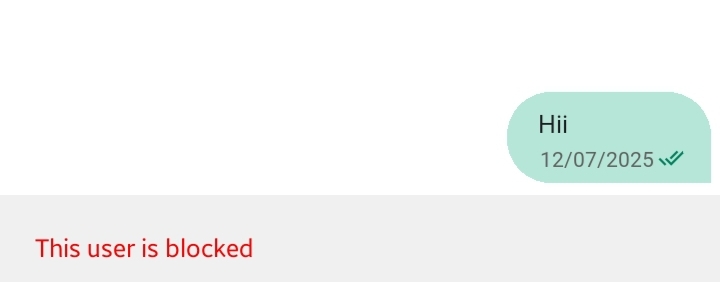
You and the blocked user will be restricted from each other’s social life at GolfGuiders
Your interactions, such as previous messages and comments, may remain but will no longer be active between you both.

Once you block a user:

  • They will no longer see your profile, posts, or stories, even if your content is set to public.
  • They will be automatically removed from your friends list.
  • They can no longer send you friend requests or messages.

Blocking is discreet — the other user is not notified when you block them.

How to Block a User

You can block someone via:

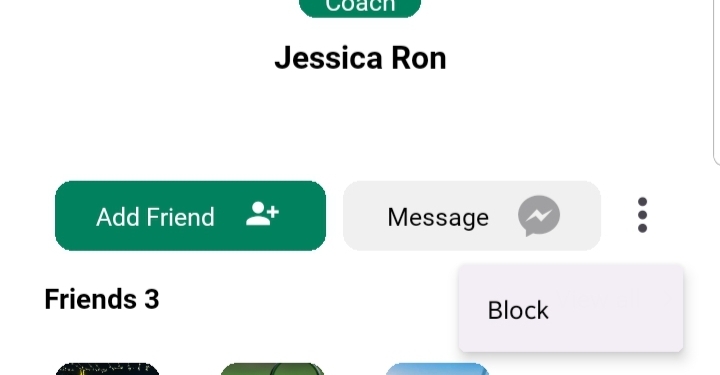
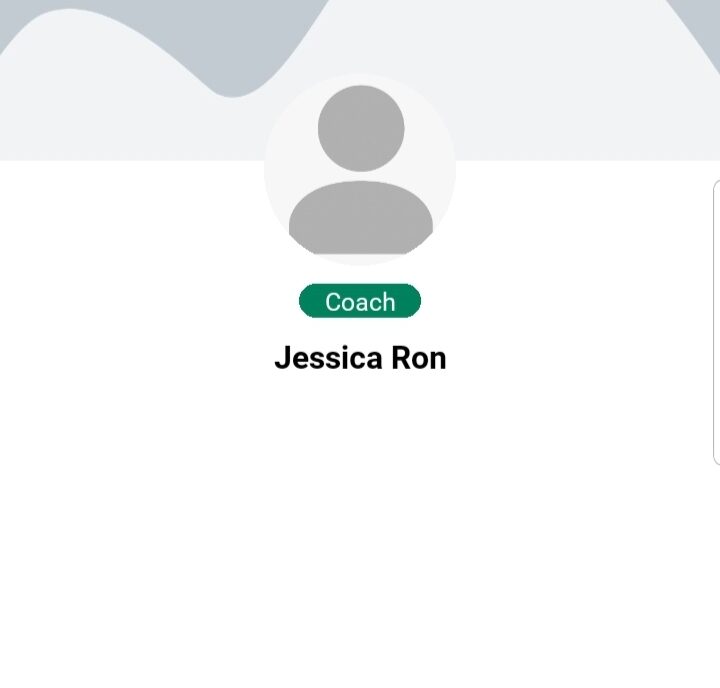
Their Profile

  • Visit the user’s profile.
  • Tap the menu (⋮) icon.
  • Select “Block User” from the options.

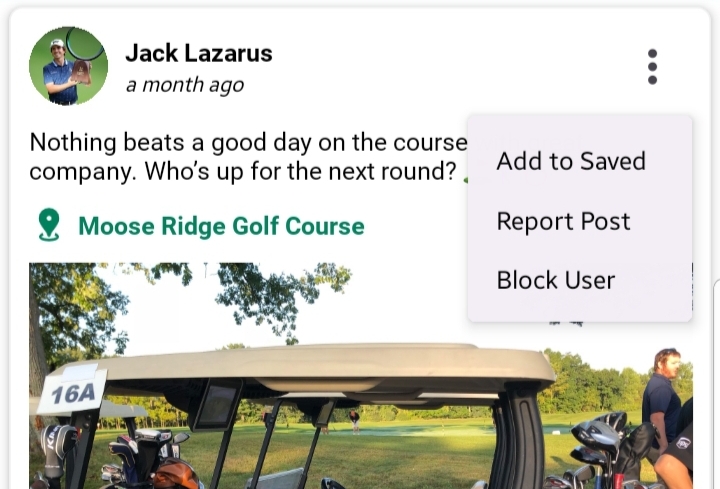
Post Interation:

  1. Tap the three-dot menu next to a post.
  2. Select “Block User” to immediately restrict them.
Managing Blocked Users
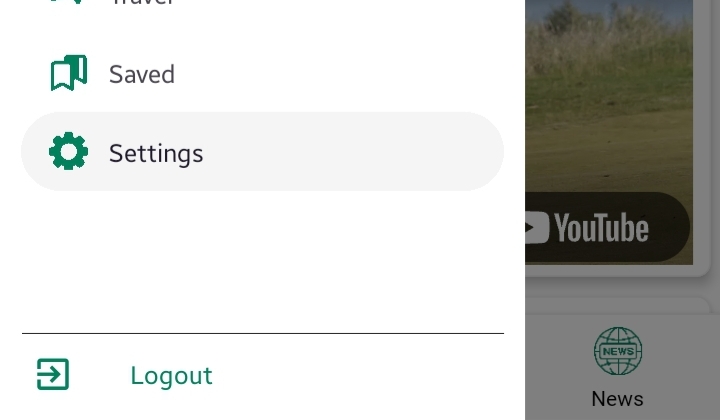
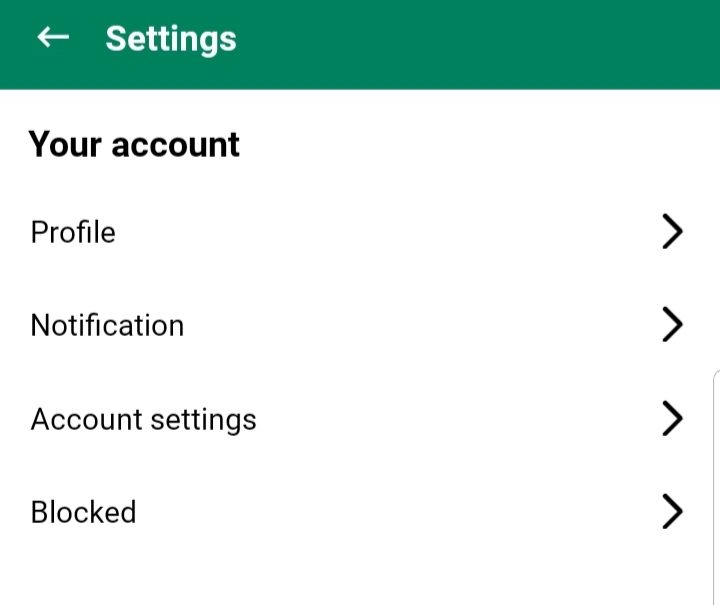
To view or manage your blocked users:

  1. Go to the “Settings” from the side menu.
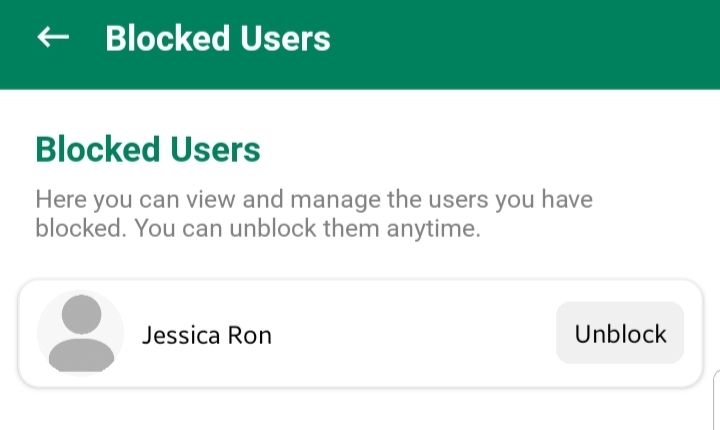
  2. Tap on the “Blocked” link.
  3. A list of all users you’ve blocked will be displayed.

Here, you can:

Unblock Users:
Simply tap “Unblock” on any user card to restore potential interaction with that person.
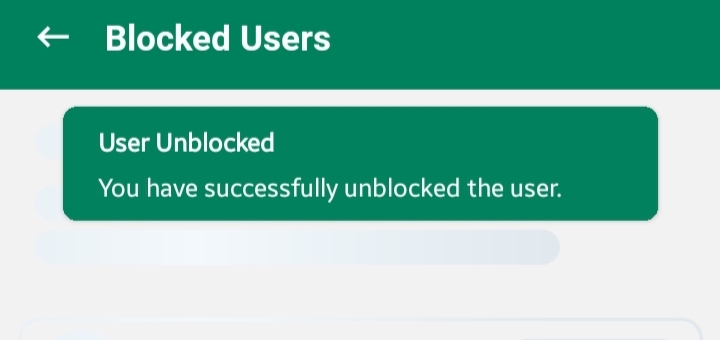
⚠️ Note: Once unblocked, the user can find you again, send friend requests, or view public content.

When to Use Blocking

  • When someone is harassing or disturbing you.
  • If you want to prevent specific users from viewing your content.
  • To maintain privacy or create a more comfortable social circle.

Blocking helps you personalize your experience without compromising on your peace of mind.

  • #account settings
  • #block
  • #coach account settings
GolfGuiders  Logo

All rights reserved

Searching in

Enter search term to find items
to navigate, to select, and to close