
The Videos tab within the Golf News section brings the golf world to life with dynamic, visual content. From professional tournament recaps to expert analyses and skill-enhancing tips, this tab is tailored for users who prefer to stay updated through engaging video media.

What You’ll Find
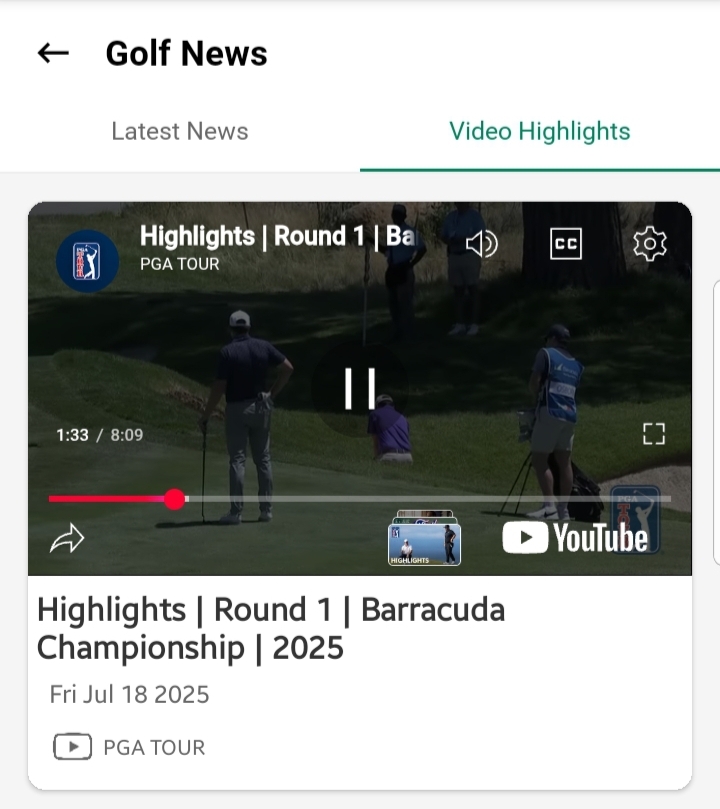
Each video card includes:
- Thumbnail Image: A visual snapshot representing the video content.
- Source Channel Name: The verified channel or media partner providing the video.
- Video Title: A concise summary of the video topic.
- Published Date: The release date of the video.
Viewing Experience
- Tap any video card to watch directly within the app’s built-in video player.
- Videos load in-app for a smooth, uninterrupted viewing experience without redirecting to YouTube or external platforms.
- Playback controls (pause, play, seek) are optimized for mobile usability.
Content Types
The Videos tab features a variety of content, such as:
- Tournament Highlights & Recaps
- Professional Game Analyses
- Coaching Tips from Experts
- Player Interviews
- Golf Equipment Reviews
- Behind-the-Scenes Coverage
User Tips
- Use Headphones: For the best audio-visual experience, especially in public places.
- Explore Frequently: New videos are regularly updated — check back often for fresh content.
- Take Notes: Jot down tips or strategies shared by professionals to apply to your own game.
- Pair with Articles: For comprehensive understanding, watch videos and then read related articles in the Articles Tab.
Notes
If a video does not play:
- Check your internet connection.
- Ensure the app is updated to the latest version.
- Clear the app cache if playback issues persist.
- Report recurring issues via the Help & Report section in the app.
The Videos Tab ensures that you’re not just reading about the golf world but watching it unfold — anytime, anywhere.