GolfGuiders  Logo
  • 1. Jira
  • Doc
  • Sample Page
  • What is GolfGuiders?
  • Web Docs
    • Getting Started
      • Reset Password
      • Access GolfGuiders Dashboard
    • Settings
    • Golf Store
      • Access Store
      • Seller Central
        • Dashboard
        • Store Customization
        • Store Pages
        • Products
        • Stocks
        • Orders
        • Invoices
        • Refunds
        • Payouts
        • Reviews
        • Discounts
      • Customer Panel
        • Dashboard
        • Addresses
        • Orders
        • Refunds
    • Shop
      • Browse Products
      • Product Details
      • Cart Manage
      • Checkout & Payment
  • App Docs
    • Getting Started
      • Download App
      • Account Setup
      • Recover Password
      • Loggin In
      • Security & Privacy
    • Marketplace
    • Bag Traxx
    • Profile Setup
      • Personal Information
      • Contact Details
      • Experience – Coach
      • Services and Pricing – Coach
      • Booking Calender – Coach
    • Social Media
      • Feeds
      • Posts
      • Stories
      • Messaging
    • Guiders AI
      • Access
      • Ask Guiders AI
      • Chat History
    • Notifications
      • Access
      • Notify Settings
      • Types
      • Manage
    • Friends
      • Friend List
      • Friend Request
      • Suggested Friends
      • Invite Friends
      • Blocking
    • Shopping
      • Browse Products
      • Product Details
      • Cart Management
      • Checkout & Payment
      • Manage Addresses
      • My Orders
      • My Refunds
    • Community
      • Browse
      • Community Detail
      • Manage Community
        • Edit Community Details
        • Create Feed
        • Create Event
        • Leagues
        • Members
      • Create Community
    • Coaches
      • Explore
      • Profile Overview
      • Book a Session
      • Sessions
      • Session Details
    • Golf Buddy
      • Create Buddy Post
      • Join Buddy Post
      • Manage Requests
      • Buddy Filters
    • Tournament
      • Play Tournament
      • Tournamnet Detail
        • Upcoming
        • Live
        • Ended
      • Create Tournament
      • Scoring Methods
    • Golf News
      • Access News
      • Articles News
      • Video News
    • Pro Leaderboard
      • Live Scores
      • Tickets
      • Tournament Details
    • GPS Navigation
      • Play
      • Explore
      • Google Maps
    • Trips
      • Browse
      • Brand Page
      • Create Brand
      • Manage
    • Account Settings
      • Phone Number
      • Password
    • Golf Store
      • Create Your Store
      • How to Access Your Store
      • Store Management
      • Store Profile & Customization
      • Products and Inventory
      • Orders and Fulfillment
      • Shipping
      • Payments and Billing
      • Customer Engagement
      • Analytics and Insights
    • Help & Report
      • Help Center
      • Report a Problem
  • Home
  • Docs
  • App Docs
  • Profile Setup
  • Personal Information
  • Web Docs
    • Getting Started
      • Reset Password
      • Access GolfGuiders Dashboard
    • Settings
    • Golf Store
      • Access Store
      • Seller Central
        • Dashboard
        • Store Customization
        • Store Pages
        • Products
        • Stocks
        • Orders
        • Invoices
        • Refunds
        • Payouts
        • Reviews
        • Discounts
      • Customer Panel
        • Dashboard
        • Addresses
        • Orders
        • Refunds
    • Shop
      • Browse Products
      • Product Details
      • Cart Manage
      • Checkout & Payment
  • App Docs
    • Getting Started
      • Download App
      • Account Setup
      • Recover Password
      • Loggin In
      • Security & Privacy
    • Marketplace
    • Bag Traxx
    • Profile Setup
      • Personal Information
      • Contact Details
      • Experience – Coach
      • Services and Pricing – Coach
      • Booking Calender – Coach
    • Social Media
      • Feeds
      • Posts
      • Stories
      • Messaging
    • Guiders AI
      • Access
      • Ask Guiders AI
      • Chat History
    • Notifications
      • Access
      • Notify Settings
      • Types
      • Manage
    • Friends
      • Friend List
      • Friend Request
      • Suggested Friends
      • Invite Friends
      • Blocking
    • Shopping
      • Browse Products
      • Product Details
      • Cart Management
      • Checkout & Payment
      • Manage Addresses
      • My Orders
      • My Refunds
    • Community
      • Browse
      • Community Detail
      • Manage Community
        • Edit Community Details
        • Create Feed
        • Create Event
        • Leagues
        • Members
      • Create Community
    • Coaches
      • Explore
      • Profile Overview
      • Book a Session
      • Sessions
      • Session Details
    • Golf Buddy
      • Create Buddy Post
      • Join Buddy Post
      • Manage Requests
      • Buddy Filters
    • Tournament
      • Play Tournament
      • Tournamnet Detail
        • Upcoming
        • Live
        • Ended
      • Create Tournament
      • Scoring Methods
    • Golf News
      • Access News
      • Articles News
      • Video News
    • Pro Leaderboard
      • Live Scores
      • Tickets
      • Tournament Details
    • GPS Navigation
      • Play
      • Explore
      • Google Maps
    • Trips
      • Browse
      • Brand Page
      • Create Brand
      • Manage
    • Account Settings
      • Phone Number
      • Password
    • Golf Store
      • Create Your Store
      • How to Access Your Store
      • Store Management
      • Store Profile & Customization
      • Products and Inventory
      • Orders and Fulfillment
      • Shipping
      • Payments and Billing
      • Customer Engagement
      • Analytics and Insights
    • Help & Report
      • Help Center
      • Report a Problem

On This Page

  • Feilds Required
    • Notes

      Personal Information

      Updated on August 11, 2025

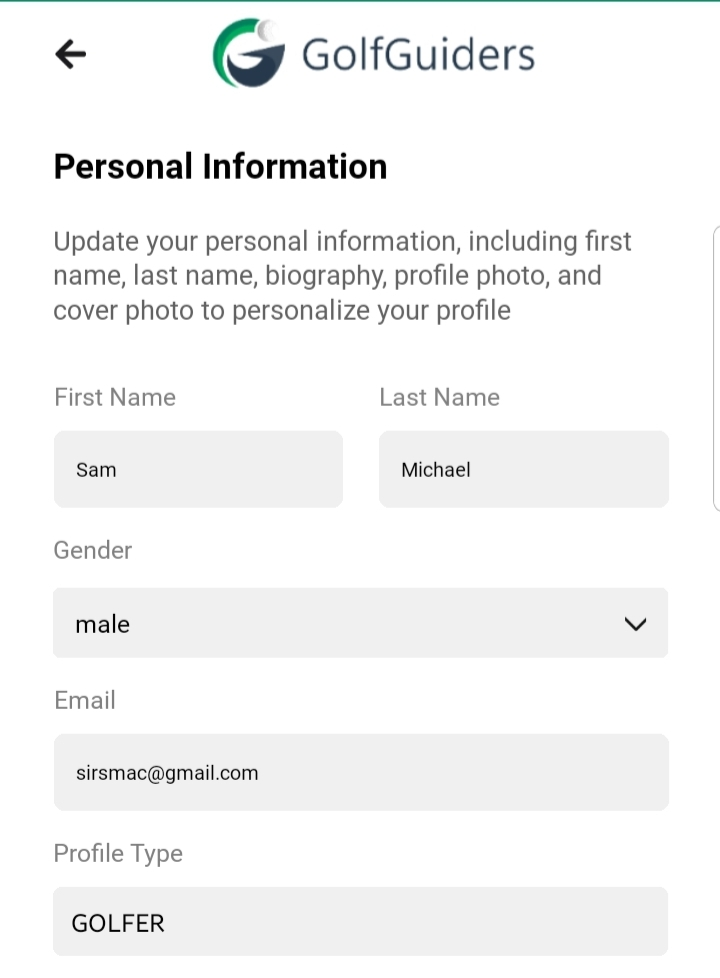
      The Personal Information section is the first and most fundamental step of the Profile Setup. It helps define your identity within the GolfGuiders platform and is visible to other users across profiles, posts, and social interactions.

      Completing this section builds trust, enhances visibility, and ensures a more personalized experience across the app.

      Access

      • Navigate
        • to Settings > Profile > Edit Profile.
        • to your Public Profile > Edit Profile
      • Step 1: Personal Information.

      Feilds Required

      • First Name & Last Name
        These are displayed publicly on your profile and in all social and community features.
      • Gender
        Select your gender to help tailor content and interactions.
      • Email
        Your registered email address, displayed for reference.
      • Bio
        A well-written bio helps others understand more about you at a glance.
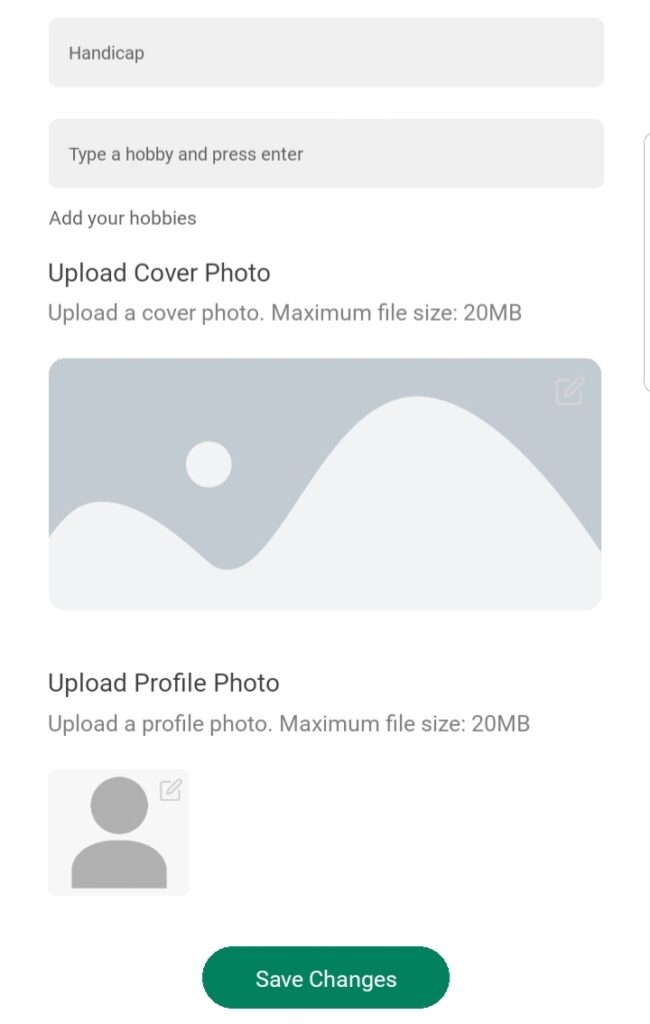
      • Handicap
        Specify your average performance score if you’re a golfer.
      • Hobbies
        Add personal interests by typing each and pressing enter.
      • Profile Photo
        This is the main image visible on your profile and throughout GolfGuiders.
      • Cover Photo
        It appears at the top of your profile page, giving it a personalized look.
      Notes

      • A completed Personal Information section enhances credibility and engagement within the community.
      • Incomplete fields may restrict access to certain features or visibility in social spaces.

      ✅ Tip: Uploading a recognizable profile picture and writing a compelling bio significantly improves your profile’s impact and trustworthiness.

      • #account settings
      • #coach account settings
      • #personal information
      • #profile
      • #profile setup

      Next

      Contact Details
      Read
      Experience - Coach
      Read
      Services and Pricing - Coach
      Read
      Booking Calender - Coach
      Read

      On This Page

      • Feilds Required
        • Notes
          Back to top
          GolfGuiders  Logo

          All rights reserved

          Searching in

          Enter search term to find items
          to navigate, to select, and to close