GolfGuiders  Logo
  • 1. Jira
  • Doc
  • Sample Page
  • What is GolfGuiders?
  • Web Docs
    • Getting Started
      • Reset Password
      • Access GolfGuiders Dashboard
    • Settings
    • Golf Store
      • Access Store
      • Seller Central
        • Dashboard
        • Store Customization
        • Store Pages
        • Products
        • Stocks
        • Orders
        • Invoices
        • Refunds
        • Payouts
        • Reviews
        • Discounts
      • Customer Panel
        • Dashboard
        • Addresses
        • Orders
        • Refunds
    • Shop
      • Browse Products
      • Product Details
      • Cart Manage
      • Checkout & Payment
  • App Docs
    • Getting Started
      • Download App
      • Account Setup
      • Recover Password
      • Loggin In
      • Security & Privacy
    • Marketplace
    • Bag Traxx
    • Profile Setup
      • Personal Information
      • Contact Details
      • Experience – Coach
      • Services and Pricing – Coach
      • Booking Calender – Coach
    • Social Media
      • Feeds
      • Posts
      • Stories
      • Messaging
    • Guiders AI
      • Access
      • Ask Guiders AI
      • Chat History
    • Notifications
      • Access
      • Notify Settings
      • Types
      • Manage
    • Friends
      • Friend List
      • Friend Request
      • Suggested Friends
      • Invite Friends
      • Blocking
    • Shopping
      • Browse Products
      • Product Details
      • Cart Management
      • Checkout & Payment
      • Manage Addresses
      • My Orders
      • My Refunds
    • Community
      • Browse
      • Community Detail
      • Manage Community
        • Edit Community Details
        • Create Feed
        • Create Event
        • Leagues
        • Members
      • Create Community
    • Coaches
      • Explore
      • Profile Overview
      • Book a Session
      • Sessions
      • Session Details
    • Golf Buddy
      • Create Buddy Post
      • Join Buddy Post
      • Manage Requests
      • Buddy Filters
    • Tournament
      • Play Tournament
      • Tournamnet Detail
        • Upcoming
        • Live
        • Ended
      • Create Tournament
      • Scoring Methods
    • Golf News
      • Access News
      • Articles News
      • Video News
    • Pro Leaderboard
      • Live Scores
      • Tickets
      • Tournament Details
    • GPS Navigation
      • Play
      • Explore
      • Google Maps
    • Trips
      • Browse
      • Brand Page
      • Create Brand
      • Manage
    • Account Settings
      • Phone Number
      • Password
    • Golf Store
      • Create Your Store
      • How to Access Your Store
      • Store Management
      • Store Profile & Customization
      • Products and Inventory
      • Orders and Fulfillment
      • Shipping
      • Payments and Billing
      • Customer Engagement
      • Analytics and Insights
    • Help & Report
      • Help Center
      • Report a Problem
  • Home
  • Docs
  • Web Docs
  • Getting Started
  • Access GolfGuiders Dashboard
  • Web Docs
    • Getting Started
      • Reset Password
      • Access GolfGuiders Dashboard
    • Settings
    • Golf Store
      • Access Store
      • Seller Central
        • Dashboard
        • Store Customization
        • Store Pages
        • Products
        • Stocks
        • Orders
        • Invoices
        • Refunds
        • Payouts
        • Reviews
        • Discounts
      • Customer Panel
        • Dashboard
        • Addresses
        • Orders
        • Refunds
    • Shop
      • Browse Products
      • Product Details
      • Cart Manage
      • Checkout & Payment
  • App Docs
    • Getting Started
      • Download App
      • Account Setup
      • Recover Password
      • Loggin In
      • Security & Privacy
    • Marketplace
    • Bag Traxx
    • Profile Setup
      • Personal Information
      • Contact Details
      • Experience – Coach
      • Services and Pricing – Coach
      • Booking Calender – Coach
    • Social Media
      • Feeds
      • Posts
      • Stories
      • Messaging
    • Guiders AI
      • Access
      • Ask Guiders AI
      • Chat History
    • Notifications
      • Access
      • Notify Settings
      • Types
      • Manage
    • Friends
      • Friend List
      • Friend Request
      • Suggested Friends
      • Invite Friends
      • Blocking
    • Shopping
      • Browse Products
      • Product Details
      • Cart Management
      • Checkout & Payment
      • Manage Addresses
      • My Orders
      • My Refunds
    • Community
      • Browse
      • Community Detail
      • Manage Community
        • Edit Community Details
        • Create Feed
        • Create Event
        • Leagues
        • Members
      • Create Community
    • Coaches
      • Explore
      • Profile Overview
      • Book a Session
      • Sessions
      • Session Details
    • Golf Buddy
      • Create Buddy Post
      • Join Buddy Post
      • Manage Requests
      • Buddy Filters
    • Tournament
      • Play Tournament
      • Tournamnet Detail
        • Upcoming
        • Live
        • Ended
      • Create Tournament
      • Scoring Methods
    • Golf News
      • Access News
      • Articles News
      • Video News
    • Pro Leaderboard
      • Live Scores
      • Tickets
      • Tournament Details
    • GPS Navigation
      • Play
      • Explore
      • Google Maps
    • Trips
      • Browse
      • Brand Page
      • Create Brand
      • Manage
    • Account Settings
      • Phone Number
      • Password
    • Golf Store
      • Create Your Store
      • How to Access Your Store
      • Store Management
      • Store Profile & Customization
      • Products and Inventory
      • Orders and Fulfillment
      • Shipping
      • Payments and Billing
      • Customer Engagement
      • Analytics and Insights
    • Help & Report
      • Help Center
      • Report a Problem

Access GolfGuiders Dashboard

Updated on July 28, 2025

Guide to access your GolfGuiders account on web

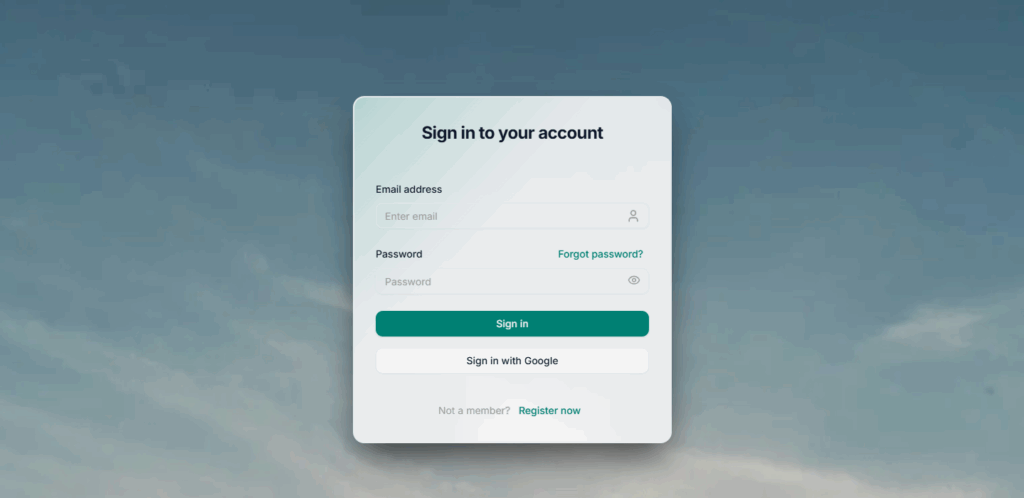
  1. Go to auth.golfguiders.com
    Log in using your registered email and password. If you’ve already used the mobile app, your credentials will work here too.
  1. Explore Your Dashboard
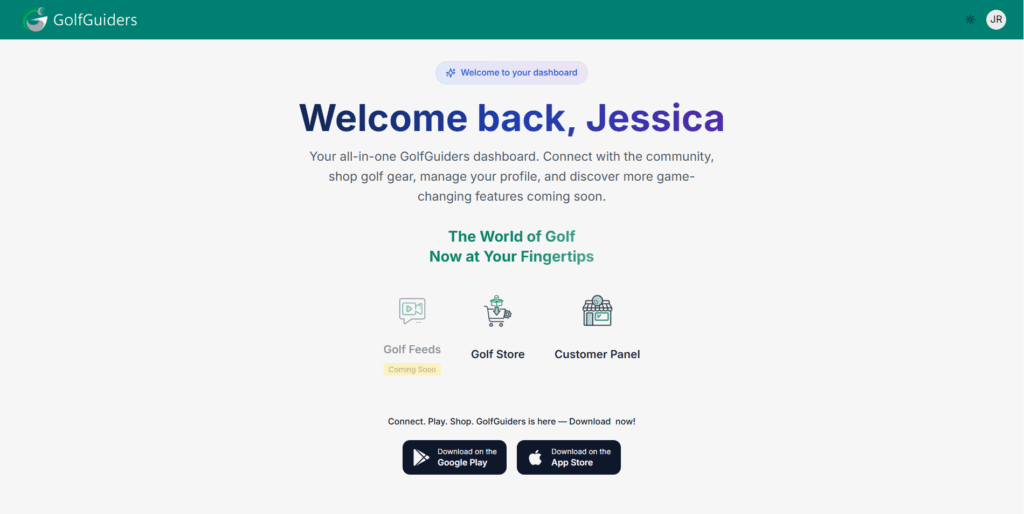
    Once logged in, you’ll be redirected to the GolfGuiders web dashboard. From here, you can access the available apps linked to your account:
    • Golf Store: A public-facing marketplace at store.golfguiders.com
    • Seller Central: A private seller dashboard for managing inventory, orders, and product listings (only visible if you’re registered as a store owner, Learn more)
    • Customer Panel: A general dashboard shown to users who are not store owners but still want to browse and engage with the store.
What You Can Do on GolfGuiders Web

  • View and manage your account details
  • Access your store or seller dashboard directly from the web
  • Browse and shop golf-related products from the public Golf Store
  • Manage your own storefront, update product listings, and fulfill orders (for store owners)
  • Seamlessly switch between mobile and web with unified account access

Once you’re set up on the web, store owners can continue with the Seller Central Guide to start managing their storefront. For general users, you can begin exploring the Golf Store and future upcoming features directly from your browser.

  • #login
  • #web
GolfGuiders  Logo

All rights reserved

Searching in

Enter search term to find items
to navigate, to select, and to close