
The Reviews page allows sellers to explore customer feedback for each product. It consists of a product list with image previews and a detailed review viewer with filters, tabs, and search capability.
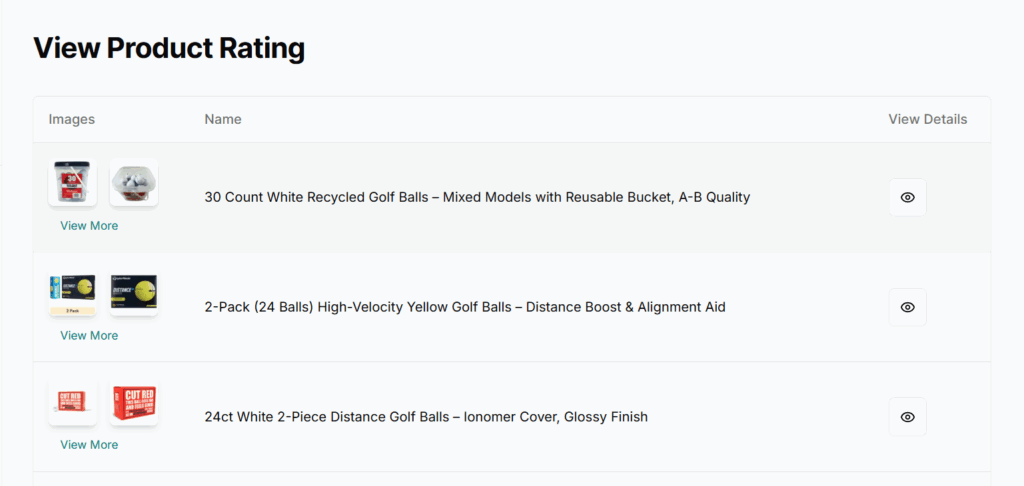
Product List Table
Each row displays:
- Product Images
- Thumbnails shown for each product.
- If the product has more than 2 images, a “View More” button appears.
- On click, it opens a modal showing all product images.
- Product Name
- Full name or title of the product.
- Action (View Ratings)
- An eye icon opens the ratings/reviews section for that product.
Product Reviews
After clicking the eye icon, a detailed review view is shown for the selected product.

Year Filter
- A year dropdown at the top allows filtering reviews by the selected year.
- Useful for tracking review trends over time.
Star Rating Tabs
- Tabs available:
- 5 Stars
- 4 Stars
- 3 Stars
- 2 Stars
- 1 Star
💡 Clicking a tab shows only the reviews of that specific rating.
Search Reviews
- Search input to find reviews by:
- User name
- Keywords inside the review
- Works in real-time and respects the active star tab + year filter.
Reviews Table
Each review row includes:
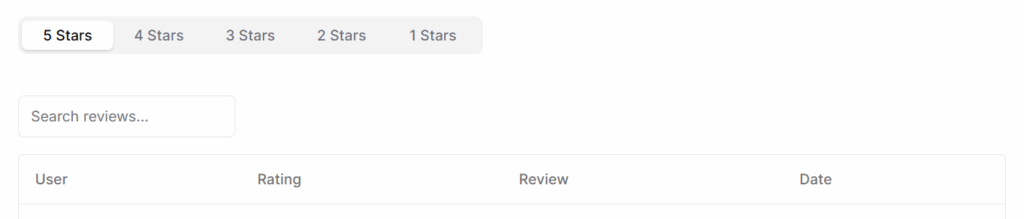
- User – Name or ID of the reviewer.
- Rating – Star rating given (numeric or icon).
- Review – Text content of the user’s review.
- Date – Date when the review was posted.
Best Practices
- Monitor Low Ratings: Regularly check 1–3 star tabs to identify and address product or service issues.
- Engage with Feedback: Where possible, respond to reviews constructively.
- Use Positive Reviews in Marketing: Highlight 5-star reviews on your product pages.
- Update Listings Based on Feedback: Make product improvements if recurring issues appear in reviews.
- Report Abusive Reviews: Use platform’s reporting tools for spam or fake reviews.